How to clear customs yourself in Spain
Introduction
If you’ve ever received a package from outside the EU, you know that before handing it over, the courier (DHL, FedEx, Correos…) sends you a message saying you have to pay customs to release the package.
What you might not know is that these companies charge you a hefty handling fee for a procedure you can do yourself in 5 minutes.
To do this, you have to get ahead of the courier: as soon as you have the tracking number, go through this procedure and send the result to the courier as soon as possible.
ℹ️ The Spanish Tax Agency (Agencia Tributaria) website is only available in Spanish, so this guide gives the Spanish name of each field and button, with a translation in brackets.
1. Tell the courier you’ll handle it yourself
Once we have the tracking number, we contact the courier handling the shipment and send the following message to their contact address. Since the message goes to the courier’s Spanish office, here it is in Spanish, followed by an English translation:
Buenos días,
Me pongo en contacto con ustedes en relación con el envío internacional [Número de seguimiento del envío] a mi nombre que está pendiente de llegar a España.
Por la presente, solicito expresamente que [Empresa de transporte] no lleve a cabo el despacho de aduanas de dicho envío, ya que realizaré personalmente los trámites aduaneros ante la Agencia Tributaria.
Les agradecería que no inicien ningún procedimiento de despacho.
Muchas gracias por su atención.
Atentamente, [Tu nombre completo]
Translation:
Good morning,
I’m contacting you regarding the international shipment [Tracking number] in my name, which is due to arrive in Spain.
I hereby expressly request that [Courier company] does not carry out the customs clearance for this shipment, as I will personally handle the customs procedures with the Tax Agency.
I would appreciate it if you did not start any clearance procedure.
Thank you very much for your attention.
Kind regards, [Your full name]
They should reply with the documents you need to clear customs yourself.
2. Gather the documentation
You’ll need the following:
- Your digital certificate or Cl@ve, to access the Tax Agency’s online services
- The tracking number
- The purchase invoice
- The details of the company you bought from (legal name and address)
3. Wait for the shipment to arrive in Spain
If the shipment hasn’t reached Spain yet, neither Customs nor the Tax Agency will have it on record, so we won’t be able to do anything with it.
4. Clear customs yourself
We do this procedure directly with the Tax Agency:
4.0. Open the form
-
Click on Comercio electrónico (E-commerce), just below “Novedades de aduanas” (Customs news)
-
Depending on the value of the shipment, click on:
- Less than €150 -> Formulario de presentación de importación de escaso valor H7 (H7 low-value import form)
- More than €150 -> Formulario para particulares en H1 (H1 form for individuals)
You’ll be asked for your digital certificate or Cl@ve.
The difference is that the Tax Agency doesn’t charge import duties on shipments under €150.
4.1. Datos de la Declaración (Declaration details)
Now we fill in the declaration details:
-
Destinatario (Recipient) -> Enter your own details here
-
Expedidor (Sender) -> These are the details of the company you bought the goods from. If you’re missing any, you can email them and ask.
-
Referencia del envío (Shipment reference) -> This is usually the tracking or waybill number.
For DHL, it’s usually the tracking number with a 0 in front.
Example: 6335077835 -> 06335077835 -
Datos del envío (Shipment details)

This section is a bit trickier.
-
Código de la mercancía (Commodity code) -> There are lots of codes for all kinds of goods, but we’ll use
9990000300, which is the one for “Declaraciones de importación realizadas por particulares” (import declarations made by individuals), and saves us any trouble. -
Naturaleza de la transacción (Nature of transaction) -> Leave it as
12 Compra por particulares(Purchase by individuals) -
Divisa (Currency) -> Pick the original currency of the purchase
-
Valor factura (Invoice value) -> Enter the value of the items in the original currency, excluding shipping costs.
-
Gastos de envío en Euros (Shipping costs in euros) -> If the shipping costs on your invoice aren’t in euros, you’ll need to convert them.
-
Descripción de la Mercancía (Description of goods) -> Briefly describe what’s in the package.
-
-
Accept the terms and click next.
4.2. Datos Adicionales (Additional details)
You’ll see a summary of everything here. Check that it’s all correct.
Fill in the invoice number if asked.
Under “Certificados de origen” (Certificates of origin), we don’t have any, so leave it blank.
Click next.
4.3. Anexar Documentación (Attach documents)
Here we have to attach the invoice.
Click “Agregar fichero” (Add file) and upload the invoice.
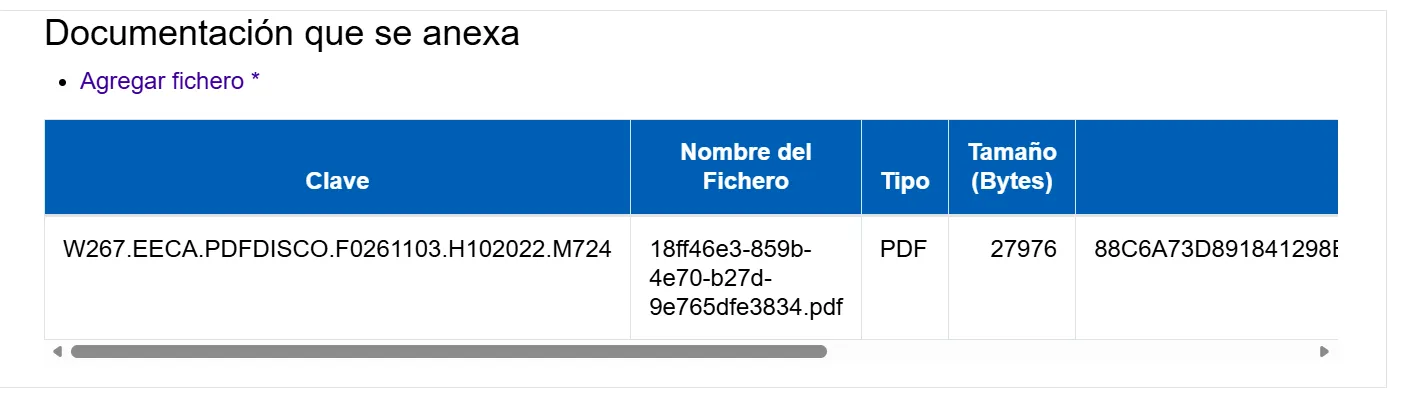
Click next.
4.4. Firma y Envío (Sign and submit)
Just click sign and submit.
4.5. Admisión (Acceptance)
Once signed, it should say the package is in the VERDE (GREEN) channel.

If so, everything’s fine and you can click next.
ℹ️ If it shows the orange or red channel, it means the Tax Agency needs to check something. Review your documents to make sure you haven’t missed anything.
4.6. Pago e Impresión (Payment and printing)

In the next step, you’ll get a payment link.
Once the payment letter opens, click on “Pago de la liquidación” (Pay the assessment):

You can pay by bank account or by card. Once paid, you can click to download the receipt:

You can now close this window.
Get the release certificate (Justificante de Levante)
Back in the “Pago e impresión” window, you’ll see the following message.
Click where it says “Pulsando aquí” (Click here):

In the window that opens, go to “Consulta de documentos electrónicos” (Electronic document lookup):

Click on “Justificante Levante en despacho” (Clearance release certificate):

Download the PDF.
Send the release certificate to the courier
All that’s left is to send the Justificante de Levante to the courier and you’re done!
They’ll clear your package through customs and deliver it to you.